
Publish a version
Publish a ready version so visitors can view it at the project address.
On this page
Note
You need Owner, Administrator or User in the Space. A Space is a shared workspace in the app.
The project has a ready version: it has Ready and has never been published. It is created by uploading an archive.
The Space has a publication available. This means a version's first publication; the app calls it Deployments. Free allows 3 in total.
Publish the version
-
Open the version list
Open the project. Versions lists versions, newest first.
-
Click the publish button
Click Publish in the version's row. Version published appears. There is no confirmation.
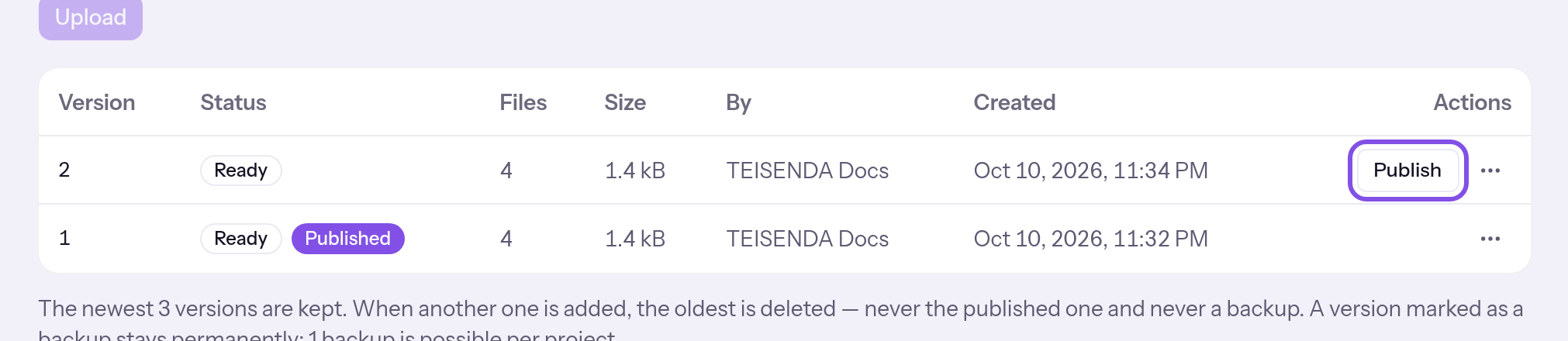
The publish button in a ready version's row.
Published marks the published version. Visitors now see it if the visibility settings grant them access.
Good to know
- Free allows 3 publications in total per Space, Max any number; counting does not restart.
- Once publications are used up, uploading is also blocked. You can still republish versions published before. More than 3 publications requires Max: Plans.
- Publishing does not change visibility: a new project stays private until you make it public.
- The previous version stays listed. You can republish it without the plan counting it: Republish an earlier version.
If something goes wrong
Your plan's deployments are used up.
The Space has used its plan's publications, 3 in total on Free. The publish button is disabled, its tooltip states why, and the same sentence appears once below the list. The version stays ready. You can still republish versions published before. Another publication requires Max: Plans.
Published, but not yet transferred to the hosting node
This is not a rejection: the change is saved in TEISENDA, but the hosting node has not accepted it. Visitors still see the previous state. Wait: the app resends automatically about every five minutes. Or click Transfer again in Status on the hosting node; see the reasons under If sending fails.
For messages such as You don't have permission for that., see Understanding hosting.
More questions about publishing
Why does my version have no publish button?
- A ready version never published before has Publish.
- A completed version published before has Publish again.
- The published version and draft have no button.
- On a narrow screen, the entry appears in the row's menu.