
Sign up and confirm your email address
Register your account and set up your first Space.
On this page
Create a TEISENDA account with a password or through Google or Microsoft. This also creates your first Space. A Space is a shared workspace in the app.
Note
Use a permanent email address that has no TEISENDA account, including an unconfirmed one.
Registration is open; otherwise the sign-up page is unavailable.
You act as a business rather than a consumer.
If you have an invitation to a Space, accept the invitation instead.
Sign up with an email address and password
-
Open the sign-up page
Open
https://app.teisenda.com/register, or click Register here on the sign-in page. -
Fill in the form
Enter First name, Last name, Email and Password. You will use this address to sign in; the password needs at least 8 characters. Tick the terms and privacy policy checkboxes and “I am acting as a business, or in the course of my trade or self-employed professional activity, and not as a consumer.”.
-
Submit your registration
Click Sign up. You receive a confirmation email; your account and first Space are created, but you are not signed in yet.
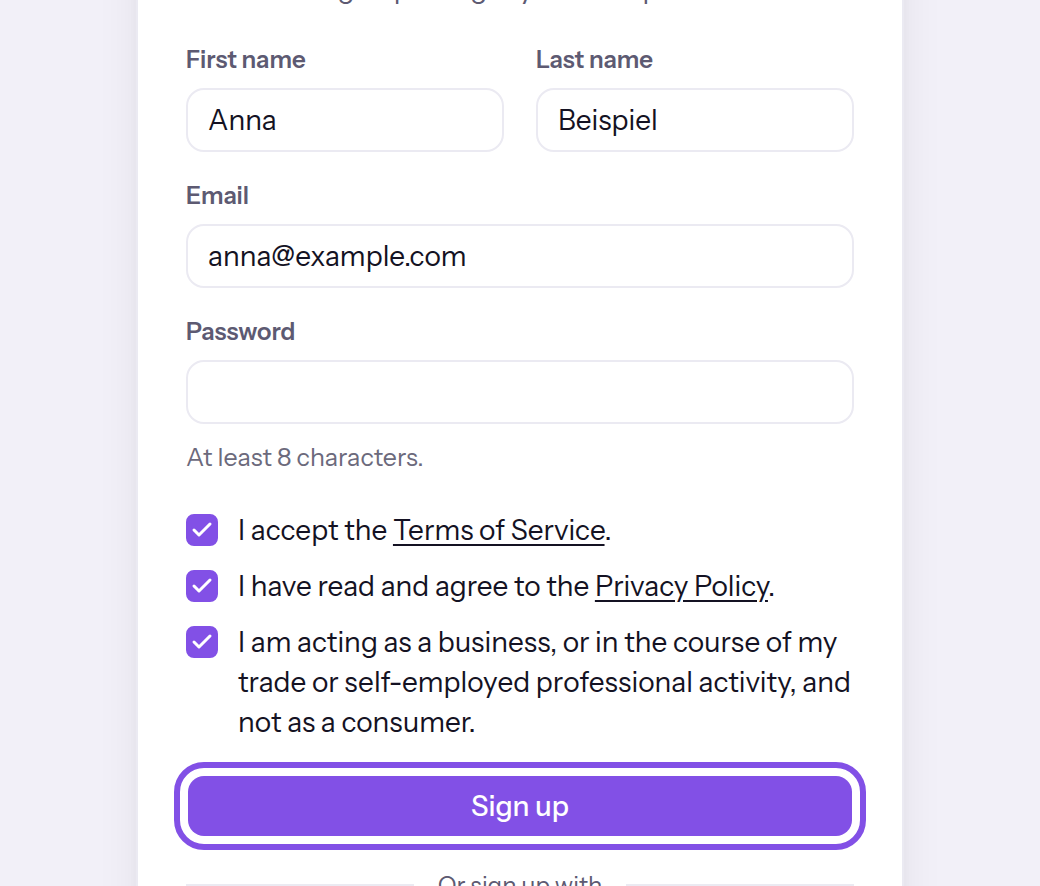
The sign-up form with its submit button.
You receive an email with the subject Confirm your email address. Its link is valid for 7 days, and your Space remains blocked until you confirm the address.
If something goes wrong
A field is highlighted
The field does not meet its requirements: a name is missing, the value is not an email address, or the password has fewer than 8 characters. The message below the field may be in English. Correct the field and submit the form again.
Please accept the Terms of Service and Privacy Policy.
The terms or privacy policy checkbox is empty. Tick both. The same message can appear on the page for completing registration through a provider.
Please confirm that you are acting as a business and not as a consumer.
The business confirmation checkbox is empty. Tick it: TEISENDA offers an account with its own Space only to businesses. The same message can appear on the page for completing registration through a provider.
An account already exists for this address. Please sign in.
The address already has an account, whether confirmed or not. Sign in, or reset the password. If you never confirmed an earlier registration, sign in and have the confirmation email sent again.
Please use a permanent email address — disposable addresses aren’t allowed.
The address's domain appears on the app's list of disposable email providers. Use a permanent email address.
Too many attempts. Please try again in … minutes.
There have been too many registration attempts in the current hour: 5 for the same address or 10 from the same IP address. Wait for the stated number of minutes, then try again.
Registration is currently unavailable.
TEISENDA closed registration while the page was open. You cannot sign up while registration is closed. The same message can appear on the page for completing registration through a provider.
More questions about signing up
The sign-up page is unavailable
Without an invitation, you can sign up only while TEISENDA has registration open. Otherwise, registration pages are unavailable and Register here is absent. You can still accept an invitation; however, joining through Google or Microsoft requires registration to be open.
Which language does my new account use?
The language shown on the sign-up page becomes your account's language. See Choose the language before signing in.
How is an account created?
An account represents one person. TEISENDA identifies it by its email address; each address can exist only once. It is created by signing up with an email address and password, signing up through Google or Microsoft, or accepting an invitation with an address that has no account yet. Signing in never creates an account. To register through a provider, use the buttons on the sign-up page.
Confirm your email address
Use the link in the confirmation email to confirm your address and unblock your first Space.
Note
The link is no more than 7 days old, and you have not requested a newer confirmation email: a newer email replaces the link.
TEISENDA has not removed the registration yet.
-
Open the link in the email
Opening the link confirms the address; there is no confirmation button. The page shows Email confirmed and Your portal is now active. Sign in to get started.
-
Sign in
Click Go to sign in and sign in. Confirmation does not sign you in.
Your address is confirmed and your first Space is open. After signing in, set it up as Owner.
If something goes wrong
This confirmation link is invalid. Please register again.
The link is incomplete or unknown: it may be mistyped, replaced by a newer confirmation email, or part of a registration TEISENDA removed. Use the link in the latest email. If the registration still exists, have the email sent again; if TEISENDA removed it, sign up again.
This confirmation link has expired. Please register again.
The link is older than 7 days. Sign in with your address and password and have the email sent again. TEISENDA rejects a new registration with the same address while the earlier one exists; you cannot follow the message's suggestion in that case.
More questions about confirmation
The confirmation email does not arrive
After signing up, click Resend email. If you have left that page, sign in with your address and password: the app takes you to Confirm your email, where you click Resend email. Sign out signs you out again.
The new link is valid for 7 days and the earlier one stops working; it does not postpone removal of the registration. You can have the email sent up to 4 times per email address and 15 times per IP address in one hour. After that, the app shows “Too many attempts” with the minutes you must wait; an email already sent remains valid.
TEISENDA removes registrations that you never confirm
Confirm your registration in time: after 7 days and a buffer of one day by default, the unconfirmed Space is removed during the next daily deletion run. The account is also removed if it does not belong to another Space.
Good to know
- No email announces or confirms removal.
- While the registration exists, its address is taken: TEISENDA rejects another registration with it, as well as sign-in and registration through Google or Microsoft.
Sign up through Google or Microsoft
A provider lets you create an account without a password. This also creates your first Space.
Note
Google and Microsoft buttons appear only where the relevant provider is configured at TEISENDA.
The provider reports your Google or Microsoft account's address as verified, and it meets the conditions above.
-
Choose the provider
On the sign-up page, click Sign up with Google or Sign up with Microsoft under Or sign up with. The browser opens the provider's sign-in page; nothing has been created yet.
-
Sign in with the provider
Sign in and allow TEISENDA to read your name and email address. The Almost done page then opens.
-
Complete registration
Tick the terms, privacy policy and business confirmation checkboxes, then click Complete sign-up. The app creates your account and first Space and signs you in.
You are signed in, your address is confirmed and your first Space is open. As Owner, set its name and time zone.
Good to know
- You have 10 minutes from clicking the provider's button to returning, in the same browser. You then have 15 minutes on Almost done.
- To change your address or security settings, or delete your account or a Space, set a password first.
If something goes wrong
Sign-in with the provider failed. Please try again.
You cancelled with the provider, the provider reported an error or supplied no email address, the response did not belong to the registration started by this browser, or more than 10 minutes have passed since the click. Click the provider's button again and complete registration in the same browser.
An account already exists for this address. Please sign in.
Your provider account's address already has a confirmed TEISENDA account. Sign in; the same provider's button on the sign-in page works for this address, as explained in Sign in through Google or Microsoft.
There's an unfinished registration for this address. Please complete it via the email link or try again later.
The address belongs to an unconfirmed registration with a password. Confirm that registration using the link in its email, or wait until TEISENDA removes it.
The provider did not confirm your email address. Please verify it with the provider or sign up with email and password.
The provider does not report the address as verified; the completion page shows The provider did not confirm your email address. Verify the address with the provider, or sign up with an email address and password.
The session has expired. Please sign up again.
More than 15 minutes passed between returning from the provider and submitting the page. Start again on the sign-up page.
Please use a permanent email address — disposable addresses aren’t allowed.
The address's domain appears on the app's list of disposable email providers. Use a provider account with a permanent email address.
Too many attempts. Please try again in … minutes.
- There have been more than 15 provider registration starts and returns from the same IP address in the current hour.
- There have been too many registration attempts: 5 per address or 10 per IP address, sharing the same counters as password registration.
Wait for the stated number of minutes, then try again.