
Hosting limits
Check plan limits, technical requirements and the return to Free.
On this page
Check your plan's limits and your website's technical requirements. Work through Claude or ChatGPT also has Connector limits.
These limits depend on the plan
Free applies unless another plan is in effect. For higher limits, purchase Max.
| Item | Free plan | Max plan |
|---|---|---|
| Total publications per Space | 3 | no limit |
| Versions retained by a project (excluding drafts and backups, including the published version) | 3 | 5 |
| Additional backups a project can have | 1 | 3 |
| Projects per Space | 1 | 10 |
| Custom domains per Space, counted across all projects | as many as the plan allows projects: 1 | as many as the plan allows projects: 10 |
| Storage per Space: all retained versions and backups across all projects | 100 MB | 5 GB |
| One version | 50 MB and 1,000 files | no plan limit; hosting node limits apply (300 MB, 5,000 files) |
| Packages raising the limits | none | 5 additional projects and therefore 5 custom domains, or 10 GB additional storage per package; up to 20 of each |
- A publication is a version's first publication; the app calls it Deployments. Uploading and republishing a previously published version do not count: Publish.
- Once publications are used up, uploading is also blocked.
- For when TEISENDA deletes versions above the retained count, see A project retains only its newest versions.
- Storage includes every retained version and backup in every project of the Space, including a draft. Deleted versions and projects no longer count. A version exactly at the limit still fits.
- For other plan allowances, see Plans; for packages, see Buy additional packages.
A disabled control states the reason
A reached limit can block creation, uploading, publishing or adding. Check the notice by the control and the usage.
Where do I find the reason?
For project creation, it is in the button's tooltip. For uploads, it appears at the upload area; for backups, in the menu entry; for domains or redirects, beside the button.
The usage card shows how close the Space is to a limit
-
Read the card on the project list
On the project list, read Usage. It shows used and allowed projects, domains and storage; Plan limit reached and Over the plan limit mark limits reached or exceeded.
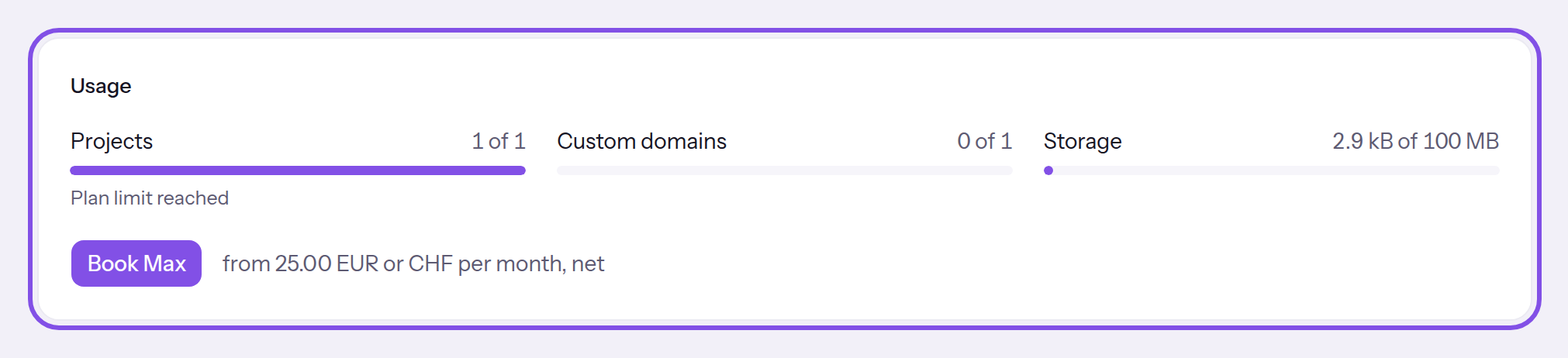
Usage on the project list.
Good to know
- At a reached limit, the card offers the larger plan, or a package on the largest plan.
- If you scheduled package removal, a row states when the lower limit applies again.
- A version's actual size is known only after unpacking. If it then exceeds the plan's size or file limit or does not fit storage, TEISENDA discards it. No older version is deleted to make room for it.
- Limit messages are explained where they appear: for projects, see Create a project; for custom domains, see Custom domain; for storage and version size, see Upload files.
You receive notices near limits
When do usage emails arrive?
- For storage, at 80 percent and when reaching the limit; if both apply, only the full-storage notice is sent.
- When a new project reaches the project limit, if the plan allows more than one project.
- At least 30 days separate emails for the same limit; the 80-percent notice is sent again only after usage falls below it.
They go to the invoice address in the invoice language. Without it, up to ten Owner receive the notice in their own languages.
These limits are set by the hosting node
These technical limits apply on Free and Max.
| Item | Value |
|---|---|
| Packed archive size | 200 MB |
| One website file | 25 MB |
| One unpacked website version | 300 MB and 5,000 files |
| Website error page | 404.html in the root folder, at most 1 MB; also applies to language folders. A larger file falls back to the default error page. |
| Versions the hosting node holds per project, in all states | 20 |
| Hostnames per project | 20. The TEISENDA address is one, leaving 19 custom domains per project. |
| Redirects per project | 200 rules |
| Visitor session on a private website | 12 hours; renewed while the visitor uses the website. TEISENDA checks again after at most 7 days. |
Why do returning visitors still see old images?
The browser may keep a public website's images and videos for 30 days, and fonts for one year. Replacing an image with the same filename can therefore leave visitors seeing the old image for up to 30 days. The browser checks HTML, JavaScript, CSS and other files again on every visit.
These limits apply to projects, uploads, domains and shares
| Item | Value |
|---|---|
| Website type | static files only; no server-side code |
| File accepted by the upload interface | exactly one archive per upload, ending in .zip, .tar, .tar.gz or .tgz; no individual files or folders |
| Drafts per project | 1 |
| Custom domain hostname | at most 253 characters, at least two parts, no IP address; without https:// or a path; not in the zones teisenda.com, teisendapages.com and teisendahosting.com |
| Projects a hostname can belong to | 1, across all Spaces |
| Primary domains per project | exactly 1 |
| Redirect | source up to 500 characters, target up to 1,000; status 301 (default), 302, 307 or 308 |
| Paths that cannot be redirect sources | /.teisenda and /.well-known/acme-challenge and everything below each |
| People individually granted access to a private website | 500 |
| Teams granted access to a private website in the dialog | exactly 1 |
| Who can access a private website | only members of the same Space |
These values apply on Free and Max.
Missed transfers are retried
For a pending transfer, check the publication message.
TEISENDA can pause a Space after a subscription ends
With hosting paused, every website in the Space is unavailable. Projects, versions and domains remain and can be viewed or deleted.
Hosting is paused if a subscription ends due to non-payment. After cancellation, websites stay online if usage fits within Free: 1 project, 1 custom domain and 100 MB storage.
Packages end with the subscription and do not count in this calculation. For cancellation and other consequences of a subscription ending, see Cancel a subscription.
Switch a paused Space to Free
Note
The Space had a subscription that ended, and TEISENDA paused it. Its usage is at most what Free allows.
You need Owner or Administrator in the Space to switch or purchase again. User and Read-only see the notice without buttons.
-
Read the notice
Open The websites in this Space are offline on a hosting or billing page. It gives the scheduled deletion date. Switch to Free or purchase Max again before then to prevent deletion.
-
Switch the Space
Click Switch to Free. The Space switches to Free without confirmation; The Space is now on the Free plan. The websites are back online. confirms it.
The notice disappears and all the Space's websites respond as before. A website taken offline at its own project stays offline.
Good to know
- Cleaning up alone ends nothing. You must press the button even if everything fits within Free.
- Purchasing again ends the pause automatically. Its button is beside Switch to Free; for the steps, see Purchase the Max plan.
- The Space is now on the Free plan. The websites will be back online in a few minutes. means sending is still pending; the app retries every five minutes.
If something goes wrong
Too much is still in use for Free:
The Space uses more than Free allows: more projects, custom domains or storage. The button is disabled, and the notice lists excess usage with used and allowed values. Delete projects, domains, versions or backups until everything fits, then switch. Or purchase again.
Only Owners and Administrators of this Space can book again or switch to Free.
You have User or Read-only in the Space. Only Owner and Administrator can purchase again or switch to Free. Ask a member with either role.
That didn't work. Please try again.
TEISENDA rejected the switch because your role no longer permits billing management, or the request stopped. If the Space's status changed meanwhile, the page reloads to show the current state. Try again.
Prevent permanent deletion of your websites
Warning
If hosting remains paused, TEISENDA permanently deletes all the Space’s websites no earlier than 30 days after hosting was paused. Projects, versions, backups, domains and redirects are lost permanently.
Purchase Max again before then, or reduce usage and switch the Space to Free. Reducing usage alone is not enough.
Which emails do I receive before deletion?
TEISENDA sends two warnings to the billing address: seven days and one day before the scheduled deletion date. If a warning is sent late, deletion moves back: at least seven days remain after the first warning and at least one day after the second. Nothing is deleted without both warnings.
After deletion, you receive another email. The Space remains, returns to Free and is no longer paused; you can create a new project.
Further details
For the consequences of cancellation or non-payment, see Cancel a subscription.