
Purchase the Max plan
Purchase Max for higher hosting limits, or change your current subscription's commitment.
On this page
Note
You have Owner or Administrator in the Space. A Space is a shared workspace in the app.
The Space is on Free and has no hosting subscription that has not ended.
Your billing country is Switzerland, Liechtenstein or an EU country.
Purchase the Max plan
-
Open the wizard
In the Space settings, open Billing and click the “Book …” button on the Free plan card.
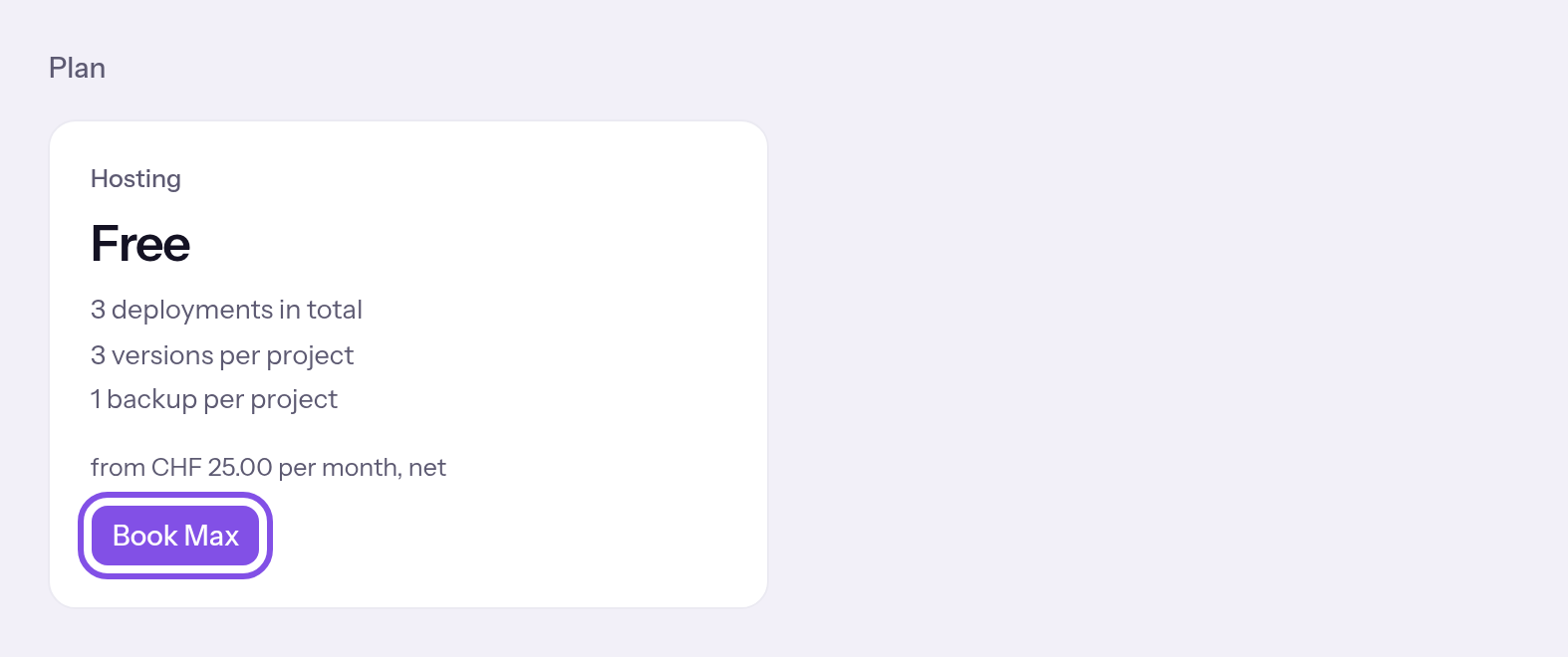
The purchase button on the plan card. -
Choose the commitment
Choose Annual commitment or Monthly, each shown with its price, then click Continue. Annual commitment is preselected.
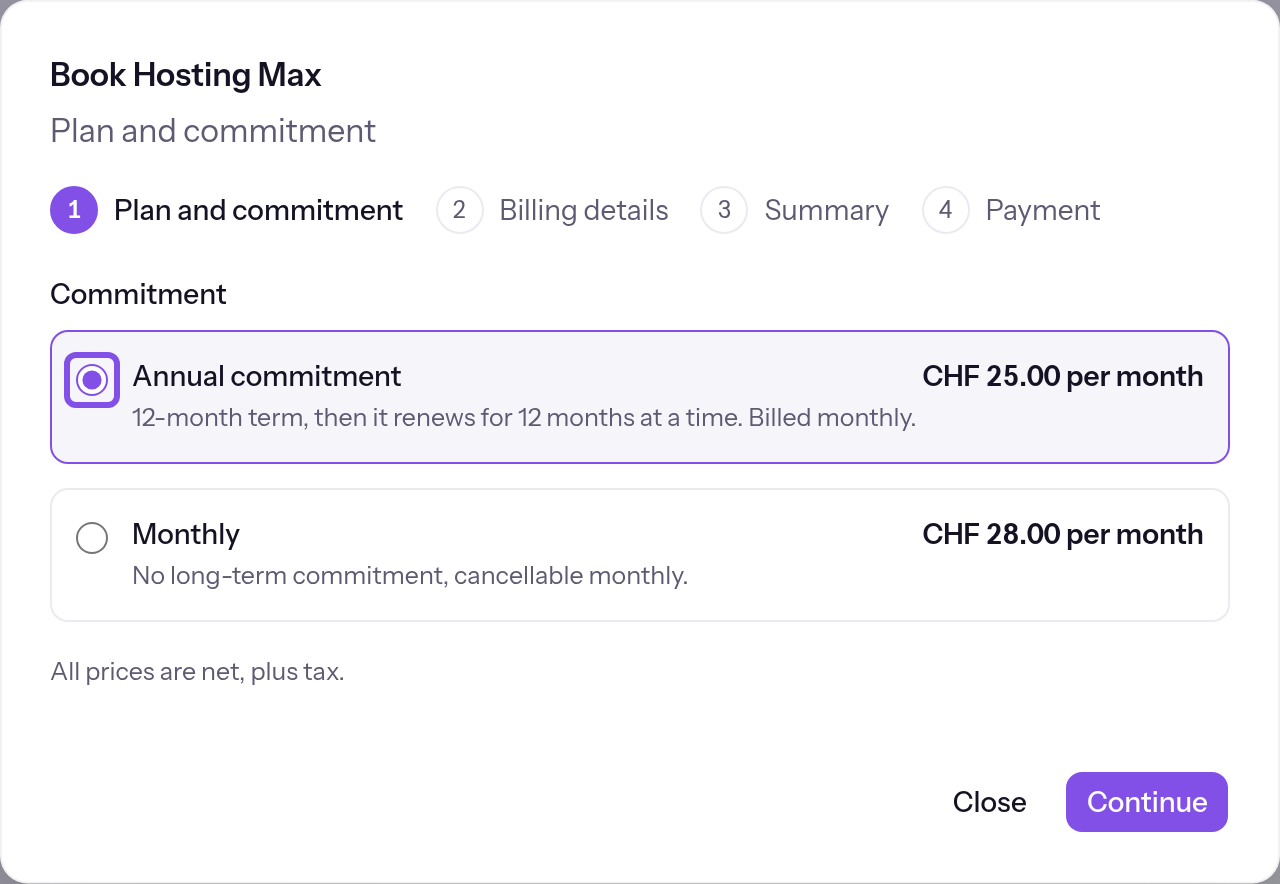
Commitment selection in the first step. -
Enter billing details
Check or complete the billing details and click Continue.
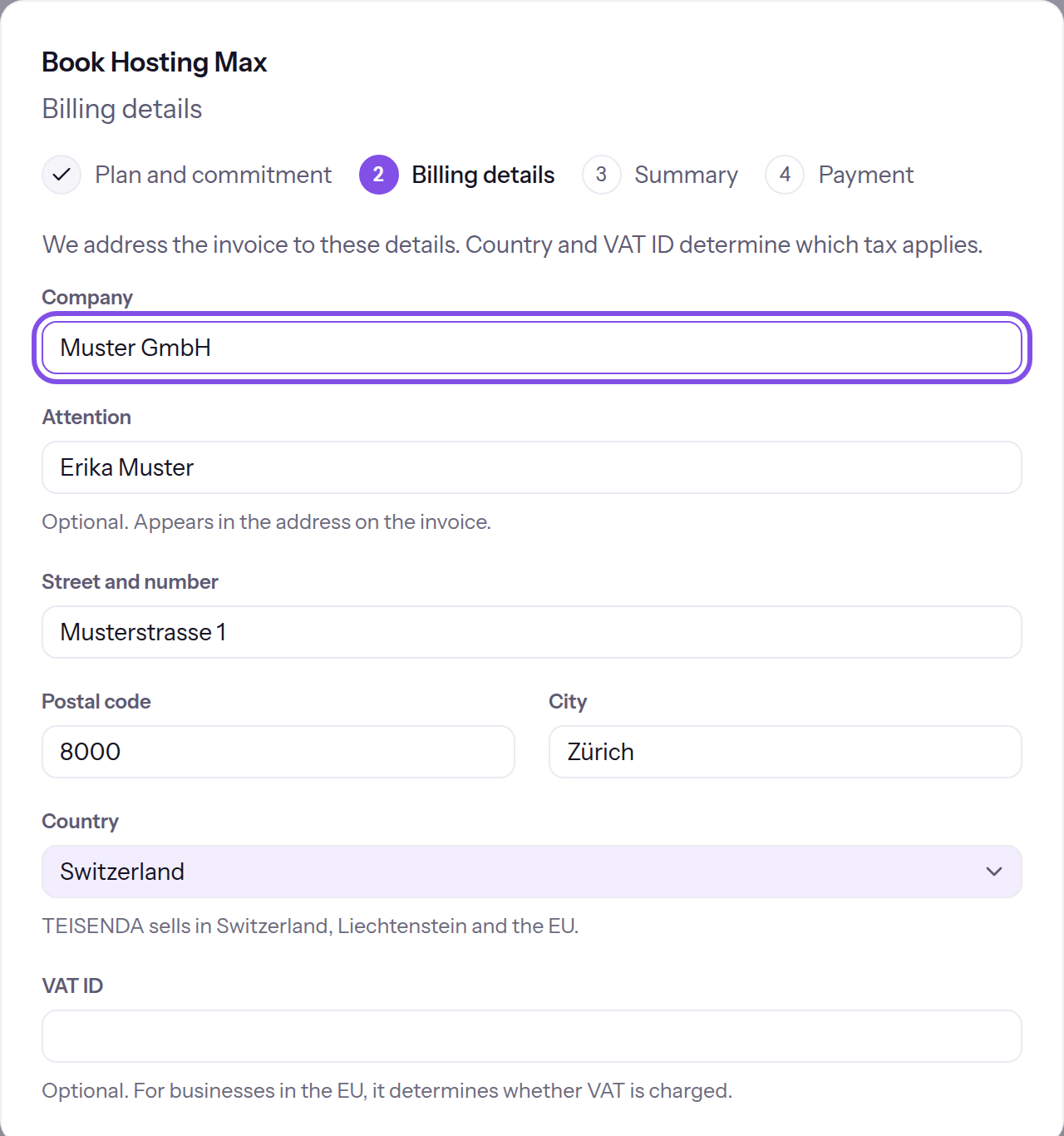
The billing details form in the second step. -
Check the summary and order
Tick I am ordering as a business, not as a consumer. and I accept TEISENDA's General Terms and Conditions. (terms) and click Order and pay.
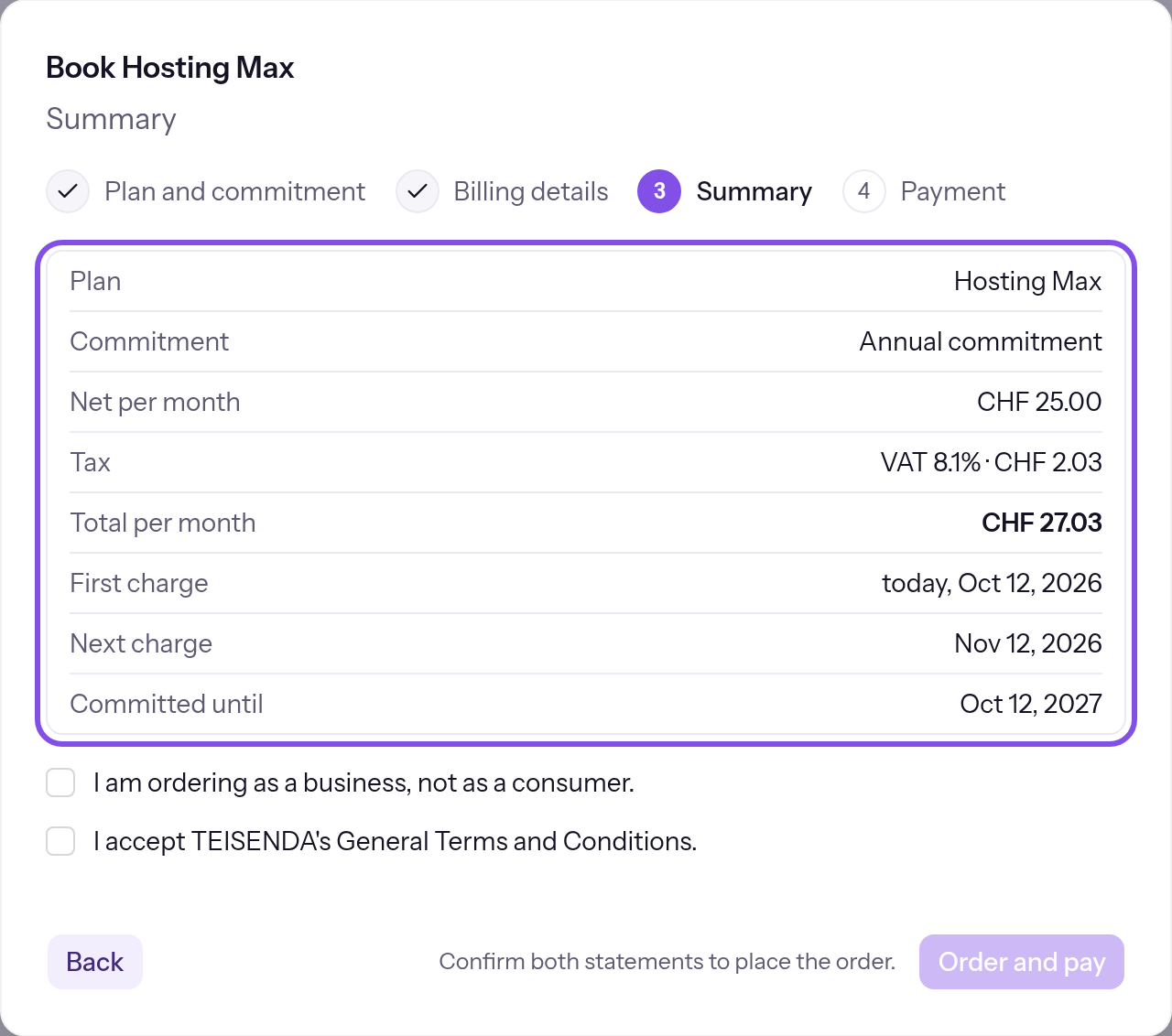
The summary and two confirmations in the third step. -
Pay the amount
Enter your card and click the “Pay …” button showing the amount. If the payment provider's page opens instead, pay there; the browser then returns you. If your bank requires confirmation, its window appears over the page.
After successful payment, Max applies. The dialog shows Payment successful; after returning from the provider, Your subscription is active. or Your payment is still being confirmed. The plan takes effect as soon as it has been received. shows the status.
Good to know
- The first charge is on the purchase date, and the next is one month later. The commitment ends after one month, or twelve months for an annual commitment. All dates use Zurich time.
- You can purchase in all 27 EU countries without a verified VAT ID.
- The price on the purchase date applies (Plans), in the billing country's currency.
- If TEISENDA paused websites after an earlier subscription ended, returning from payment brings them back in the same step. If the hosting node does not respond, a later sync restores them.
If something goes wrong
Only Owners and Administrators can book.
You have User or Read-only and the button is disabled. A member with Owner or Administrator must purchase.
Switching plans is not enabled yet.
The plan card shows a disabled button instead of the purchase button because no payment provider is configured here. You cannot change this; purchasing is unavailable.
Booking isn't possible yet: no payment provider has been set up.
The payment provider did not respond when TEISENDA calculated the offer, or TEISENDA has no payment return address. You cannot change this; purchasing is unavailable.
The payment provider isn't responding right now. Please try again in a moment.
The payment provider did not respond when you ordered or when the summary loaded. Try again a little later.
No billing details have been saved yet.
No billing details are saved yet. Complete the wizard's second step.
The billing details are incomplete.
The saved billing details are incomplete or invalid. Complete them in the wizard's second step.
A subscription for this product is already running.
The Space already has a hosting subscription that has not ended. You do not need another purchase; the current subscription appears on the plan card.
This Space has already booked in a different currency. The billing country cannot be changed to a country with a different currency.
The Space previously purchased in a currency different from the one now determined by the billing country. Choose a billing country using the original purchase's currency.
We don't currently sell in this country.
The billing country is neither Switzerland nor Liechtenstein nor an EU member state. You cannot purchase for this country.
Confirm both statements to place the order.
The order button stays disabled until both checkboxes are ticked.
You don't have permission to book.
TEISENDA rejected the purchase because you are not Owner or Administrator, or your session expired. Sign in again as Owner or Administrator.
Booking isn't possible right now.
The purchase failed for another reason, for example because TEISENDA has no price for the date or could not calculate an offer. Try again later; if it persists, contact support.
The payment didn't go through. Check your details or use a different card.
The payment provider rejected payment in the dialog; the dialog shows the provider's message if supplied. The card fields stay open: check the card details or use another card.
The card fields can't be loaded here. You can pay on Stripe's payment page.
The card fields could not load in the dialog. Use Go to Stripe's payment page to pay on the provider's page.
Payment is being confirmed
Payment confirmation is still pending. The dialog checks automatically for a while, then offers Check again.
More questions about purchasing
Which emails do I receive after purchasing?
TEISENDA sends them to the invoice email address in the billing details, using the stored invoice language. Without billing details, nothing is sent.
- “… has been purchased”, once, when the subscription becomes active or past due.
- “Your invoice … from TEISENDA” with the PDF, when TEISENDA delivers the first invoice document. It goes to the address on that document.
Switch between monthly and annual commitments
Switching between monthly and annual commitments takes effect at the end of the current commitment.
Note
You have Owner or Administrator in the Space.
The subscription is active: the first payment arrived, it is not past due or cancelled, and no change is scheduled.
-
Open the change dialog
On Billing, click Switch commitment below the subscription summary.
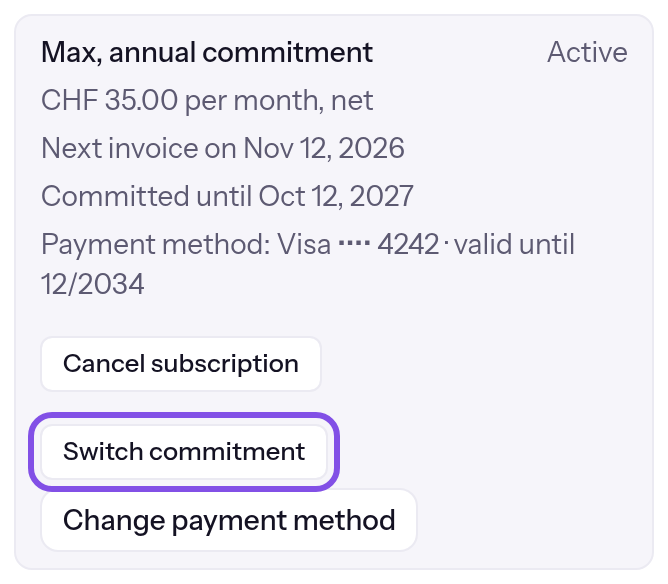
The change-commitment button. -
Confirm the change
Click Continue, then Confirm switch.
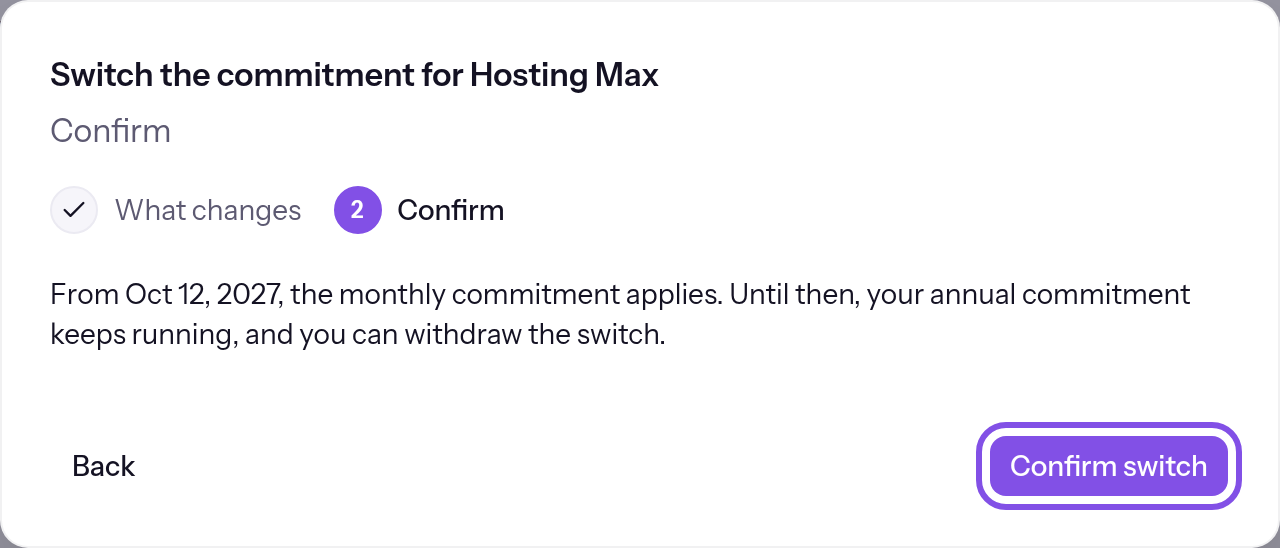
The confirm button.
The subscription summary shows the scheduled change and its date.
Good to know
- From monthly to annual, the subscription switches with the next invoice; the twelve months start from that invoice. From annual to monthly, it switches at the end of twelve months; you can then cancel monthly.
- Until the change date, your purchased commitment applies. TEISENDA makes no prorated adjustment. If you cancel afterwards, cancellation takes priority and the commitment does not change.
If something goes wrong
Only people who are allowed to manage billing can change the commitment.
You have User or Read-only and the button is disabled. A member with Owner or Administrator must change the commitment.
The commitment can't be switched right now: no payment provider has been set up.
No payment provider is configured here, and the button is disabled. You cannot change this.
The first payment is still outstanding.
The first payment is pending. Complete it first.
The payment is overdue. Settle it first – then the commitment can be switched.
The subscription is past due. Pay first: Change your payment method.
The subscription is cancelled. Withdraw the cancellation first.
The subscription is cancelled. Withdraw cancellation first: Withdraw a cancellation.
A change is already scheduled.
A change is already scheduled. Withdraw it first: Withdraw a scheduled change.
The next invoice is being created right now. Please try again in a few minutes.
The change date has arrived and the next invoice is being created. Try again in a few minutes.
No subscription is running.
No subscription is running: the Space is on Free, has Max without a subscription, or the subscription has ended. Purchase first: Purchase the Max plan.
The payment provider isn't responding right now. Please try again in a moment.
The payment provider did not respond. Try again a little later.
You don't have permission to do this.
TEISENDA rejected the change because you are not Owner or Administrator, or your session expired. Sign in again as Owner or Administrator.
The status has changed in the meantime. Reload the page.
The subscription's status changed after you loaded the page. Reload it.
Something on the subscription is being changed right now. Please try again in a moment.
Another subscription change is in progress. Try again a little later.
That didn't work. Please try again.
The request itself failed. Try again.
The commitment can't be switched right now.
Another reason: TEISENDA cannot give a price or date, or the subscription already has this commitment. Reload the page; if it persists, contact support.
More questions about changing commitments
Which commitment emails do I receive?
TEISENDA sends them to the invoice email address in billing details, using the stored invoice language. Without billing details, none is sent.
- “Change confirmed: new commitment for … from …”, when the change is scheduled.
- “Your annual commitment for … renews on …”, once per annual commitment end, within the preceding 30 days. It is sent only if the subscription is not cancelled and no switch to monthly is scheduled, and mentions that switch as another option.
- “Change withdrawn: … stays as it is”, after you withdraw a scheduled change.
Withdraw a scheduled change
You can withdraw a scheduled change before its effective date.
Note
You have Owner or Administrator in the Space.
A commitment change is scheduled but not effective yet.
-
Open the confirmation
Below the subscription summary, click Withdraw switch in the scheduled change's row.
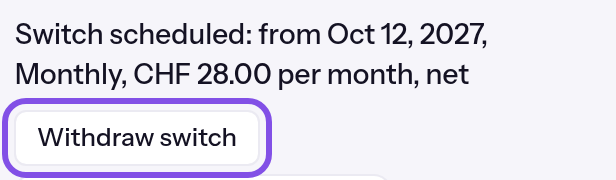
The scheduled change's row. -
Confirm withdrawal
Click Withdraw switch in the confirmation. A message shows The switch has been withdrawn.
Your current commitment and price remain; an annual commitment renews for twelve months at its end.
If something goes wrong
No switch is scheduled.
No change is scheduled anymore, or it is already effective. Reload the page.
The payment provider isn't responding right now. Please try again in a moment.
The payment provider did not respond. Try again a little later.
Something on the subscription is being changed right now. Please try again in a moment.
Another subscription change is in progress. Try again a little later.
That didn't work. Please try again.
The request itself failed. Try again.
This switch wasn't registered in time and doesn't apply. Withdraw it and order it again.
The change row carries this label if TEISENDA did not register the change with the payment provider in time. Such a change does not take effect.